Command Palette

Search for a command to run...

FreePromoDeal
All deals

Shop by Category

ElectronicsMobilesFashionHome & KitchenBooksSports & FitnessBeauty & HealthToys & GamesAll categories →

Shop by Store

AmazonFlipkartAll stores →

Guides & Editorial

Buying guidesThis week's roundupSale calendarAll articles →
Sign in
FPD
Home›Deals›TV & Home Entertainment›Remote Control Compatible with Amazon Alexa Fire TV Stick (3rd Generation) Firestick Third Gen Bluetooth Replacement of Original
Remote Control Compatible with Amazon Alexa Fire TV Stick (3rd Generation) Firestick Third Gen Bluetooth Replacement of Original-73%
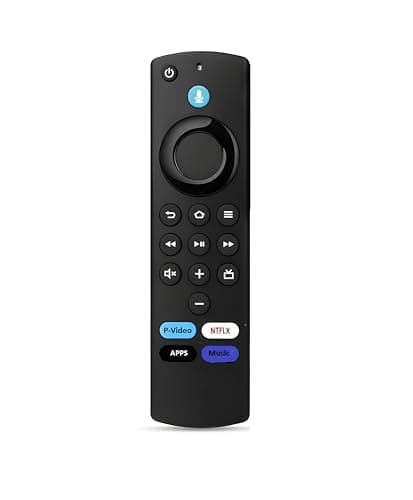
Remote Control Compatible with Amazon Alexa Fire TV Stick (3rd Generation) Firestick Third Gen Bluetooth Replacement of Original
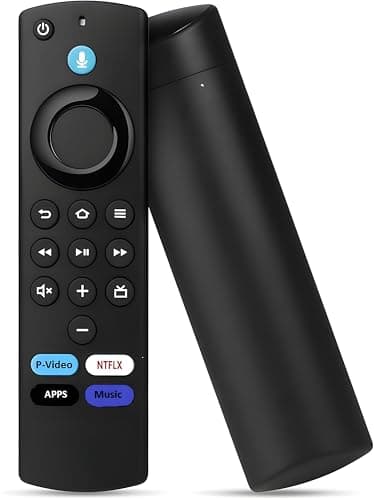
Remote Control Compatible with Amazon Alexa Fire TV Stick (3rd Generation) Firestick Third Gen Bluetooth Replacement of Original 2
Remote Control Compatible with Amazon Alexa Fire TV Stick (3rd Generation) Firestick Third Gen Bluetooth Replacement of Original 3
Remote Control Compatible with Amazon Alexa Fire TV Stick (3rd Generation) Firestick Third Gen Bluetooth Replacement of Original 4
Remote Control Compatible with Amazon Alexa Fire TV Stick (3rd Generation) Firestick Third Gen Bluetooth Replacement of Original 5
AmazonHot Deal

Remote Control Compatible with Amazon Alexa Fire TV Stick (3rd Generation) Firestick Third Gen Bluetooth Replacement of Original

₹399₹1,499

You save ₹1,100

⚡ Lowest in 30 days

✓ Verified 10 Jul

S

Deal Score

Lowest price ever

Buy at Amazon — ₹399

↗ Opens on Amazon — verify price before checkoutAs an Amazon Associate, FreePromoDeal earns from qualifying purchases.

Share:WhatsAppTelegramX

Editor's note

Key highlight: How to Pair: There are 3 Method's to pair this remote control with FireTv Stick Device. Method 1: Simply hold Home Key f. At ₹399 — 73% off MRP — this is one of the steepest discounts we've tracked on this item. Hard to pass up at this price. Check the latest reviews on Amazon before you buy.

About this deal

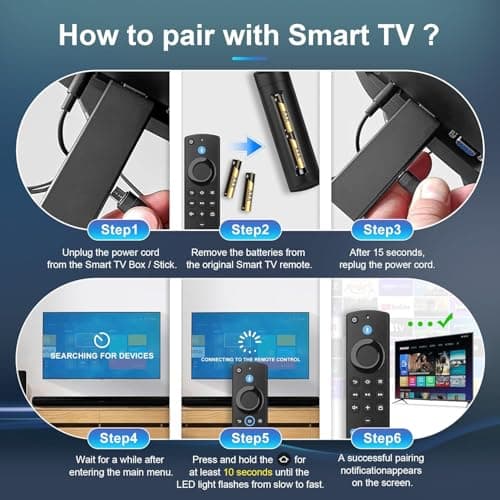
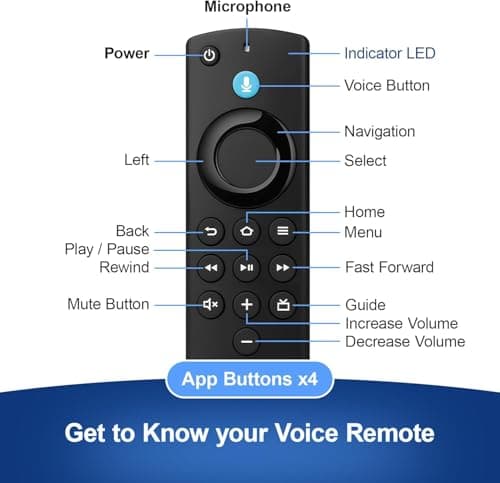
How to Pair: There are 3 Method's to pair this remote control with FireTv Stick Device. Method 1: Simply hold Home Key for 10-15 seconds within 3 meters distance and get paired, if not paired Opt Next process.. Method 2: Step 1: Restart your Fire TV Stick:Unplug the Fire TV Stick and plug it back in 60 seconds later. Step 2: Reset the remote (for some models):Press and hold Back + Menu + Left on the navigation ring for 10 seconds, then hold the Home button for 10 seconds. Make sure the remote is within 10 feet (3 meters) of the Fire TV Stick. If Second Method also not get paired then Opt Final Process.. Method 3: Install Fire tv app in your Smart Phone and make sure the Mobile and Fire tv stick are in the same WiFi network and logged in with the same amazon account. Once the network and mail id matches, You will be able to see the Installed fire tv stick’s name. You can then go on and connect the same. A passcode will appear in the TV screen which you should type in the mobile to connect. Once connected, the Fire tv app in the mobile can be used as a remote for Fire tv stick.. Using it, you should navigate to HOME-SETTINGS-CONTROLLERS & BLUETOOTH DEVICES-AMAZON FIRE TV REMOTES-ADD NEW REMOTE-Press home button in the new remote till remote’s light blinks continuously-new remote will show up in the TV screen-SELECT THE NEW REMOTE USING THE MOBILE APP.. Troubleshooting Tip】 If you experience issues like non-functional volume buttons, Power On/Off not working, or inability to control your TV, it may be due to firmware incompatibility between the remote and your Fire TV Stick device. This is clearly explained and visually highlighted in our product descriptions. Please ensure your device firmware is updated and compatible with the remote version. Enhanced Compatibility: The Amazon Fire Stick 3rd Generation remote is compatible with various devices, including the fire stick 4k. This fire stick tv remote ensures you can enjoy your Amazon Fire TV stick 4k and other models w

Key features

  • ✓How to Pair: There are 3 Method's to pair this remote control with FireTv Stick Device. Method 1: Simply hold Home Key for 10-15 seconds within 3 meters distance and get paired, if not paired Opt Next process.
  • ✓Method 2: Step 1: Restart your Fire TV Stick:Unplug the Fire TV Stick and plug it back in 60 seconds later. Step 2: Reset the remote (for some models):Press and hold Back + Menu + Left on the navigation ring for 10 seconds, then hold the Home button for 10 seconds. Make sure the remote is within 10 feet (3 meters) of the Fire TV Stick. If Second Method also not get paired then Opt Final Process.
  • ✓Method 3: Install Fire tv app in your Smart Phone and make sure the Mobile and Fire tv stick are in the same WiFi network and logged in with the same amazon account. Once the network and mail id matches, You will be able to see the Installed fire tv stick’s name. You can then go on and connect the same. A passcode will appear in the TV screen which you should type in the mobile to connect. Once connected, the Fire tv app in the mobile can be used as a remote for Fire tv stick.
  • ✓Using it, you should navigate to HOME-SETTINGS-CONTROLLERS & BLUETOOTH DEVICES-AMAZON FIRE TV REMOTES-ADD NEW REMOTE-Press home button in the new remote till remote’s light blinks continuously-new remote will show up in the TV screen-SELECT THE NEW REMOTE USING THE MOBILE APP.
  • ✓Troubleshooting Tip】 If you experience issues like non-functional volume buttons, Power On/Off not working, or inability to control your TV, it may be due to firmware incompatibility between the remote and your Fire TV Stick device. This is clearly explained and visually highlighted in our product descriptions. Please ensure your device firmware is updated and compatible with the remote version
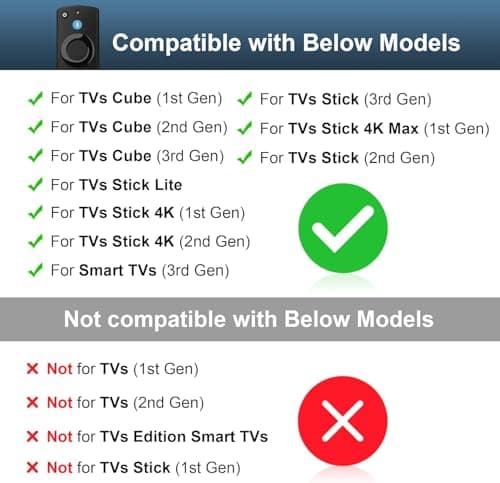
  • ✓Enhanced Compatibility: The Amazon Fire Stick 3rd Generation remote is compatible with various devices, including the fire stick 4k. This fire stick tv remote ensures you can enjoy your Amazon Fire TV stick 4k and other models with ease, enhancing your media experience.
  • ✓Please use fresh new batteries in order for the remote to work efficiently.

Community (0)

0/1000

Loading…

Related deals

Compaq 140 cm (55 inch) Ultra HD (4K) LED Smart Android TV with 2 GB RAM, Dolby Audio, Bezel-less Screen,WCG+(CQV55AX1UD)-81%
Flipkart

Compaq 140 cm (55 inch) Ultra HD (4K) LED Smart Android TV with 2 GB RAM, Dolby Audio, Bezel-less Screen,WCG+(CQV55AX1UD)

₹9,499₹48,999
LG 139 cm (55 inch) OLED Ultra HD (4K) Smart WebOS TV(OLED55C2PSC)-50%
Flipkart

LG 139 cm (55 inch) OLED Ultra HD (4K) Smart WebOS TV(OLED55C2PSC)

₹1,09,990₹2,19,990
ONIDA NEXg 139 cm (55 inch) Ultra HD (4K) LED Smart Google TV with Dolby Atmos Vision & HDR10(55UIG)-33%
Flipkart

ONIDA NEXg 139 cm (55 inch) Ultra HD (4K) LED Smart Google TV with Dolby Atmos Vision & HDR10(55UIG)

₹30,799₹45,990
Sansui 140 cm (55 inch) Ultra HD (4K) LED Smart Google TV with HDR10| HLG| Dolby Audio| HSR 120Hz Refresh Rate| MEMC| 30W Surround Sound| FloLED Panel(JSW55UG23)-37%
Flipkart

Sansui 140 cm (55 inch) Ultra HD (4K) LED Smart Google TV with HDR10| HLG| Dolby Audio| HSR 120Hz Refresh Rate| MEMC| 30W Surround Sound| FloLED Panel(JSW55UG23)

₹37,990₹59,990

Read our TV & Home Entertainment buying guide →

FreePromoDeal earns an affiliate commission when you buy through links on this page. Prices are provided by the merchant and may change.

Discover

  • All deals
  • Categories
  • Stores
  • This week
  • Saved deals

Read

  • Buying guides
  • Editor's notes
  • Deal roundups

Company

  • About
  • Contact
  • Privacy
  • Terms

Subscribe

5 hand-picked deals every morning at 9 AM IST.

Join Telegram
FreePromoDeal·Curated daily deals from Amazon, Flipkart, Meesho and more. Verified by editors before they go live.

As an Amazon Associate, FreePromoDeal earns from qualifying purchases. Prices are subject to change.